
Invoice and PO matching software that checks every line
Invoice matching software compares each supplier invoice with its purchase order and delivery note before payment. It only works if the three documents are read line by line, with quantities, units and prices as separate fields. Koncile does that reading and checking on PDFs, scans and handwritten documents, then hands the data to the ERP or AP tool that pays.
What invoice and PO matching software does
Before an invoice is paid, someone in accounts payable (AP) checks that it bills what was ordered and what was received. Invoice matching software automates that check. It reads the purchase order (PO), the delivery note or goods receipt and the supplier invoice, lines them up and flags every difference: a quantity billed but never delivered, a unit price above the agreed one, a line that is not on the order, an invoice that arrives twice.
The rule has two common forms. Two way matching compares the invoice with the PO: same items, same quantities, same prices. Three way matching adds the delivery note, so the invoice is only paid for what actually arrived. Some teams add a fourth document, the inspection or quality report. The method itself (tolerances, exceptions, partial deliveries) is a subject of its own; this page is about the software and what it needs to work.
One thing to know from the start: matching is only as good as the data it runs on. Most AP suites assume the PO and the receipt are already clean records in the ERP. In practice, many POs, delivery notes and invoices still arrive as PDFs, scans, faxes or phone photos. That reading step is where Koncile works.
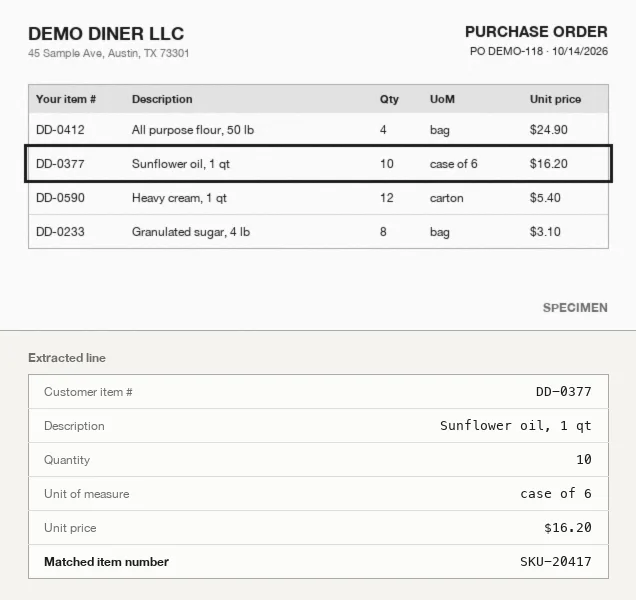
Why matching the totals is not enough: a worked example
Take PO DEMO-118 from Demo Diner LLC: four lines, subtotal $351.20. The supplier ships, the receiving clerk signs a delivery note, and an invoice arrives a week later.
| Item | Ordered (PO) | Received (delivery note) | Invoiced | Line result |
|---|---|---|---|---|
| DD-0412 flour, 50 lb | 4 bags at 24.90 = 99.60 | 4 bags | 4 bags at 24.90 = 99.60 | Match |
| DD-0377 sunflower oil | 10 cases of 6 at 16.20 = 162.00 | 8 cases | 10 cases at 16.80 = 168.00 | 2 cases not received, price +0.60 |
| DD-0590 heavy cream | 12 cartons at 5.40 = 64.80 | 12 cartons | 12 cartons at 5.40 = 64.80 | Match |
| DD-0233 sugar, 4 lb | 8 bags at 3.10 = 24.80 | 8 bags | 2 cases of 4 at 12.40 = 24.80 | Match after unit conversion |
| Subtotal | 351.20 | 357.20 | Gap of 6.00 (1.7 %) |
A check on the invoice total alone sees a gap of $6.00, or 1.7 %. With a common header tolerance of 2 %, the invoice passes and is paid in full.
A line by line check tells another story. On the sunflower oil, only 8 cases arrived and the agreed price was $16.20. The amount that should be paid on that line is 8 × 16.20 = $129.60, not $168.00. The invoice is overbilled by $38.40, or about 12 % of what is actually owed ($318.80). The total gap looked small because a price increase and a missing delivery were folded into one number.
The sugar line shows the opposite trap. The supplier bills 2 cases of 4 bags at $12.40 instead of 8 bags at $3.10. Same goods, same amount, different unit of measure (UoM). A tool that compares quantities without converting units raises a false exception, and someone loses ten minutes on a line that was right.
This is why the data has to come back line by line, with the quantity and the unit as two separate fields, and with the PO number on every document so the three can be tied together.
What the software has to read on each document
| Document | Header fields | Line fields |
|---|---|---|
| Purchase order | PO number, date, vendor, buyer, ship to, currency, payment terms | SKU or item number, description, quantity, unit of measure, unit price, line total |
| Delivery note or goods receipt | Delivery note number, PO number, delivery date, vendor | SKU, description, quantity delivered, unit, sometimes batch or lot number |
| Supplier invoice | Invoice number, invoice date, PO number, vendor, subtotal, tax, total, currency | SKU, description, quantity billed, unit, unit price, line total |
Three fields cause most matching failures. The PO number, when the invoice prints a customer reference instead, or puts it in a footer: it is the one field that ties the two documents together (see purchase order vs invoice, field by field). The item number, when the supplier uses its own SKU and yours only appears in the description. The unit, when one document counts cases and another counts pieces. A matching tool that does not handle these three ends up sending most invoices to manual review.
How Koncile handles PO, delivery note and invoice
Koncile is a document extraction platform with a control layer, built in Paris. For matching, it does the part most AP suites leave to the ERP or to a person: turning three documents in three different layouts into structured data that can be compared line by line.
- Intake. Documents arrive by a dedicated email address, by API or by upload. A PDF that holds several documents is split, and each page is classified as a PO, a delivery note or an invoice.
- Extraction. Each document is read with a template from the same library: header fields, then every line, with quantity and unit of measure as two fields. Scans, faxes, photos and handwritten delivery notes are read too.
- Controls. Each value carries a confidence score; below your threshold it goes to a person. Totals are recomputed from the lines, and lines are matched to your item catalog or another reference table by exact match, fuzzy match or AI similarity, which is how a supplier SKU is brought back to your item number.
- Comparison and export. The PO number, quantities and prices of the three documents are returned line by line, so the comparison of ordered, received and billed can run on data. Results go out as JSON, Excel or CSV, by API, webhook or Make and n8n, to the ERP or AP tool that approves and pays.
Below is a shortened extraction of the invoice from the example, in the format returned by the Koncile API. Each document of the trio comes back the same way, so the lines can be joined on the PO number and the item number.
{
  "General_fields": {
    "Invoice number": {"value": "INV-5521",  "confidence_score": 0.99},
    "PO number":      {"value": "DEMO-118",  "confidence_score": 0.98},
    "Subtotal":       {"value": "357.20",    "confidence_score": 0.98}
  },
  "Line_fields": {
    "SKU":        [{"value": "DD-0412"}, {"value": "DD-0377"}, ...],
    "Quantity":   [{"value": "4"},       {"value": "10"}, ...],
    "Unit":       [{"value": "bag"},     {"value": "case of 6"}, ...],
    "Unit price": [{"value": "24.90"},   {"value": "16.80"}, ...],
    "Line total": [{"value": "99.60"},   {"value": "168.00"}, ...]
  }
}
If you want to see it on your own documents, an account comes with 20 free credits, one credit per page, without a card. Plans start at €199 per month for 1,000 pages (pricing).
What Koncile does not do
Koncile reads and checks documents. It is not an AP suite and not a purchasing suite, and it is better to know where the line is before testing it.
- It does not create purchase orders and has no approval workflow for spend: that half of purchase order processing stays in your ERP or procurement suite.
- It does not approve or pay invoices: the decision and the payment stay in your ERP or AP tool.
- It does not check that goods physically arrived: it reads what the receiving clerk wrote on the delivery note.
- ERP connections go through the API, a webhook or an automation tool such as Make or n8n, rather than native connectors.
- Cramped handwriting, low resolution scans and photos taken at an angle remain the first sources of reading errors. Confidence scores send those lines to a person rather than guessing.
Where exactly the comparison and its tolerances are run, in Koncile's control layer or in your ERP after export, depends on your setup and your volumes: it is the first thing to settle on a call with our team.
How to choose invoice matching software
| Question | Why it matters |
|---|---|
| Does it match at line level, not only on totals? | The example above passes a 2 % header tolerance while overbilling 12 % on one line. |
| How does it read paper and PDF documents? | Matching assumes clean data. If delivery notes are scanned or handwritten, the reading step decides the result. |
| Does it split quantity and unit of measure? | Without it, cases against pieces creates false exceptions on correct invoices. |
| Can it map supplier SKUs to your item numbers? | Suppliers rarely print your references. Catalog matching or a cross reference table closes the gap. |
| Are tolerances set per line, per vendor, per amount? | A flat percentage on the total hides line errors; a zero tolerance floods the team with exceptions. |
| Is the price public, and can you test on your own files? | A trial on 20 of your real invoices says more than a demo on vendor samples. |
Large AP suites such as Coupa, Tipalti, Medius or BILL include matching inside a complete payables workflow, from approval to payment, and assume the PO and receipt already live in their system. An extraction platform such as Koncile fits teams that keep their ERP or AP tool and need the documents read and checked before they get there. Our comparison of purchase order OCR tools covers which extraction tools announce matching and at what price.
Frequently asked questions
01What is invoice matching software?
Software that compares a supplier invoice with the purchase order, and often with the delivery note, before payment. It flags quantities billed but not received, prices above the agreed one, lines that are not on the order and duplicate invoices, so only those exceptions reach a person.
02What is PO matching?
PO matching is the check that an invoice corresponds to an approved purchase order: same supplier, same items, same quantities and prices, within an agreed tolerance. Two way matching compares invoice and PO; three way matching adds the delivery note or goods receipt.
03What is the difference between two way and three way matching?
Two way matching compares the invoice with the PO. Three way matching also compares it with what was received, using the delivery note or goods receipt. Three way matching catches deliveries that were short or never arrived, which two way matching cannot see.
04Why do invoices fail matching when nothing is wrong?
The most frequent causes are a unit of measure that differs between documents (cases against pieces), a supplier SKU that is not your item number, a PO number printed in an unusual place, and partial deliveries invoiced in one go. Line level extraction with the unit as a separate field and catalog matching remove most of these false exceptions.
05Can matching work with scanned or handwritten delivery notes?
Yes, if the reading step handles them. Koncile reads scans, faxes, photos and handwritten documents and returns a confidence score on each value. Cramped handwriting and low resolution scans are the main sources of errors, which is why uncertain values are sent to a person.
06Does Koncile pay or approve invoices?
No. Koncile reads the PO, the delivery note and the invoice, checks the data and sends it to your ERP or AP tool, where approval and payment happen.
07Which ERPs does it work with?
Data goes out as JSON, Excel or CSV, through the API, a webhook or automation tools such as Make and n8n. Any ERP or AP tool that accepts an API call, a webhook or a file import can receive it; there are no native ERP apps.
08How much does it cost?
20 free credits at signup, one credit per page. The Advanced plan is €199 per month excluding tax for 1,000 credits, Pro €799 for 5,000, Enterprise on quote. Matching three documents uses one credit per page of each document.
Test matching on your own POs and invoices
Upload a purchase order, its delivery note and its invoice, and look at what comes back line by line. No card, no call.
Create a Koncile account, 20 free creditsTalk to an expert
20 free credits, no credit card. For professional use only.