
Purchase order processing software for the POs you actually receive
Purchase order processing software covers two different jobs: issuing and approving POs, and turning the PO documents that land in your inbox into checked data. Most tools in this category do the first. Koncile does the second: it reads purchase orders in any layout and format, line by line, recomputes the totals, flags what does not add up and sends clean lines to your ERP. It does not create or approve POs.
Two kinds of purchase order processing software
Search for purchase order processing software and most results are purchasing tools: software where an employee raises a request, a manager approves it and the system issues a purchase order (PO) to the supplier. (For the basics of the document itself, see what is a purchase order.) That is the procurement side, and it lives in procurement suites, ERP purchasing modules and the PO features of accounting software.
The other half starts once a PO exists as a document. A customer emails you its PO as a PDF. A supplier sends back an order confirmation. A signed copy of your own PO comes back scanned. Someone has to read each one and put its lines into a system. This is where the hours go in most order desks and AP teams, and it is the half this page is about.
| Creating and approving POs | Processing PO documents | |
|---|---|---|
| Main question | Who may buy what, from whom, at what price? | What does this PO actually say, and is it consistent? |
| Input | A request typed into the tool | PDF, scan, fax, photo or handwritten form, in someone else's layout |
| Output | A new PO sent to a supplier | Structured header and line data, with checks, for your ERP |
| Typical tools | Procurement suites, ERP purchasing modules, accounting software | Document extraction platforms with a control layer, such as Koncile |
| Needs OCR? | No: the data is born digital | Yes: the data is locked in a document |
Many teams need both. If your POs are already created in an ERP and never leave it as paper, you may not need the second kind at all. The moment POs travel as files between companies, you do.
Where PO documents pile up
Purchase order documents reach a company through four doors, and each one ends with someone keying lines:
- Customer POs on the sales side. Each customer sends its own layout, SKUs and descriptions, mostly by email. Turning them into sales orders is covered in detail on our sales order automation page.
- Order confirmations from suppliers. The supplier's answer to your PO, with its own quantities, prices and delivery dates. It is the first document where a gap with what you ordered shows up.
- Signed or annotated copies of your own POs. Returned scanned, sometimes with a handwritten change to a quantity or a date.
- POs attached to invoices and delivery notes. On the AP side, the PO is the reference that the receipt and the invoice are compared with, line by line.
The difficulty is the same at every door: the layout is not yours, the document may be a scan or a photo, and a PO can run to dozens of lines over several pages.
A worked example: one morning, six documents, five formats
Take a specimen inbox at a distributor on a Monday morning. Six purchase order documents have arrived, in the multi-format mix that automated purchase order processing has to absorb. The table shows what happens to each one.
| Document | Format | What happens | Result |
|---|---|---|---|
| Customer PO 7731, 14 lines | Native PDF, 2 pages | Text read directly; the line table continues on page 2 and comes back as one list of 14 lines | 14 lines, totals consistent: passes |
| Three customer POs scanned together | Scanned PDF, 1 file | File split into 3 documents, each classified as a PO, then read | 3 POs, 22 lines: pass |
| Handwritten order form, 6 lines | Phone photo | Read as a whole page; the quantity on line 4 comes back with a confidence score of 0.61 | Line 4 to review, 5 lines pass |
| Customer PO 55-208, 5 lines | Fax | Read, then every line recomputed: 24 × 12.75 = 306.00, but the line total printed is 360.00 | Held: line total disagrees by 54.00 |
| Supplier confirmation of your PO 4500-1187 | Read with the PO number, quantities, prices and dates, ready to set against your order | Confirmed date Nov 16, your PO said Nov 9: flag to the buyer | |
| Customer order sheet | Excel file | Not an OCR job: a spreadsheet is already data | Goes straight to your import |
Four documents go straight through. The handwritten line waits for a person because the reading is uncertain, not because the software guessed. The fax is the interesting one: the reading is fine, but the document itself is inconsistent. Either the unit price or the line total was mistyped by the customer, and only a person who knows the account can say which. Keyed by hand, that line usually goes in as printed.
The last row is a limit worth stating: Koncile reads PDF, JPG and PNG files. Spreadsheets and EDI messages do not need reading, only mapping.
How Koncile processes purchase orders
Koncile is a document extraction platform with a control layer, built in Paris. It does not replace your ERP, your procurement suite or your order management system: it does the reading and the checking upstream, so what reaches them is a clean set of lines.
- Intake. POs arrive on a dedicated email address, by API or by upload in the web interface: PDF, JPG and PNG up to 20 MB. A PDF that holds several orders is split, then each document is classified.
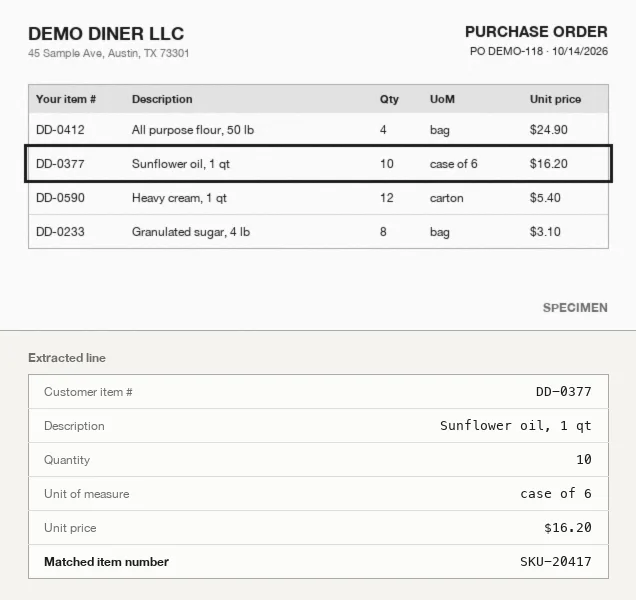
- Reading. Text, tables and handwriting are read page by page, including faxes and skewed scans. Header fields land in their place (PO number and date, buyer, vendor, ship to, payment terms), then one row per line with SKU, description, quantity, unit of measure (UoM), unit price and line total.
- Checks. Totals are recomputed from the lines and compared with the printed subtotal and total. Every field carries a confidence score; below your threshold, it goes to review. A PO received twice is flagged by duplicate detection.
- Matching. Each line can be matched to your item catalog by exact match, fuzzy match or AI similarity, and the PO number ties the PO to its delivery note and invoice for invoice matching.
- Export. Lines go out as JSON, Excel or CSV, or by API and webhook as soon as extraction is done. NetSuite, QuickBooks, Dynamics or Odoo receive orders through the API, webhooks or Make; SAP through the API, Make, n8n, Zapier or Power Automate.
Below is a shortened extraction of the faxed specimen, in the format returned by the purchase order OCR API. The third line carries the disagreement: quantity and unit price are read with high confidence, so the gap is in the document, not in the reading.
{
  "General_fields": {
    "PO number":  {"value": "55-208",     "confidence_score": 0.97},
    "PO date":    {"value": "2026-10-30", "confidence_score": 0.95},
    "Buyer":      {"value": "Lakeside Supply Co.", "confidence_score": 0.96},
    "Subtotal":   {"value": "1184.40",    "confidence_score": 0.94}
  },
  "Line_fields": {
    "Description": [..., {"value": "Nitrile gloves, box of 100"}, ...],
    "Quantity":    [..., {"value": "24",     "confidence_score": 0.96}, ...],
    "Unit":        [..., {"value": "box"}, ...],
    "Unit price":  [..., {"value": "12.75",  "confidence_score": 0.95}, ...],
    "Line total":  [..., {"value": "360.00", "confidence_score": 0.93}, ...]
  }
}
To try it on your own POs, an account comes with 20 free credits, one credit per page, without a card. Plans start at €199 per month excluding tax for 1,000 pages, that is €0.20 per page, with the app and the API (pricing). Koncile publishes over 99 % accuracy on the key fields of invoices and purchasing documents; the figure that matters to you is the share of your own POs that need no correction, and only a test on your documents gives it.
What Koncile does not do
Since most purchase order processing software is about creating POs, the line is worth drawing clearly.
- It does not create, approve or send purchase orders. That stays in your ERP or procurement suite.
- It does not decide what happens to a held line: it shows the inconsistency, a person settles it.
- It does not pay invoices or run an approval workflow for spend.
- It does not read spreadsheets or EDI messages, which are already data.
- ERP connections go through the API, a webhook or an automation tool such as Make or n8n, rather than native apps inside the ERP.
- Cramped handwriting, low resolution scans and photos taken at an angle remain the first sources of reading errors. Confidence scores send those fields to a person rather than guessing.
How to choose purchase order processing software
Start with the job. If you need to issue and approve POs, compare procurement suites and ERP modules, and none of the questions below matter much. If you need to read PO documents, ask these, to any vendor, ours included.
| Question | Why it matters |
|---|---|
| Does it read any layout without a template per sender? | A rule per layout works for five senders, not for five hundred. |
| Does it return every line item, across pages? | Header fields are the easy part. A 40 line PO split over three pages is where tools differ. |
| Are quantity and unit of measure separate fields? | "10 cases of 4" keyed as 10 ships a quarter of the order. |
| Does it recompute totals and show a confidence score per field? | Without both, you cannot tell a reading error from an error in the document, and you review everything. |
| Does it handle scans, faxes, photos and handwriting? | Those are the documents that take longest to key by hand. |
| Can lines be matched to your catalog and to invoices? | Reading is only useful if the result can be checked against your own data. |
| Is the price public, and can you test on your own POs? | Twenty of your real documents tell you more than a demo on vendor samples. |
For a side by side view of extraction tools that read purchase orders, with their prices and limits, see our comparison of the best purchase order OCR software.
Frequently asked questions
01What is purchase order processing software?
The term covers two kinds of tools. Purchasing software creates, approves and sends purchase orders. Document processing software reads the PO documents a company receives or gets back, extracts the header and line items, checks them and sends the data to the ERP. Koncile is the second kind.
02Is purchase order processing software the same as purchasing software?
Not always. Purchasing or procurement software manages the request, approval and issue of POs. Processing software, in the document sense, handles the PO once it exists as a file: reading it, checking it and getting its lines into a system without retyping.
03What does automated purchase order processing mean?
Replacing manual keying of PO documents with software that reads them, checks the totals and the lines, and exports the result to the ERP. Only the documents or lines that fail a check reach a person.
04Which PO formats can be processed?
Koncile reads PDF, JPG and PNG files up to 20 MB: native PDFs, scans, faxes, phone photos and handwritten order forms. A PDF holding several POs is split automatically. Spreadsheets and EDI messages are already structured and do not need OCR.
05Can it handle POs with many lines over several pages?
Yes. Line tables are read page by page and returned as one list, with quantity, unit of measure, unit price and line total in separate fields, so a long PO comes back in the same shape as a short one.
06How long does it take to process a purchase order?
By hand, it depends on the number of lines and on how readable the document is. With extraction, the reading is automatic and the time left is review: the share of POs that need a correction depends on your documents, which is why a test on a sample of your own POs is the useful measure.
07Does it integrate with my ERP?
Through your stack rather than native apps. Koncile exports JSON, Excel or CSV and pushes data by API and webhook. NetSuite, QuickBooks, Dynamics or Odoo receive orders through the API, webhooks or Make; SAP through the API, Make, n8n, Zapier or Power Automate.
08How much does it cost?
Koncile is priced per page analyzed. An account starts with 20 free credits. The Advanced plan is €199 per month excluding tax for 1,000 credits, that is €0.20 per page, and the Pro plan brings it to €0.16 per page.
Test it on your own purchase orders
Upload a few POs, the faxed and handwritten ones included, and look at what comes back line by line. No card, no call.
Create a Koncile account, 20 free creditsTalk to an expert
20 free credits, no credit card. For professional use only.